भाषा बदलें
08045804700
info@multybyte.com
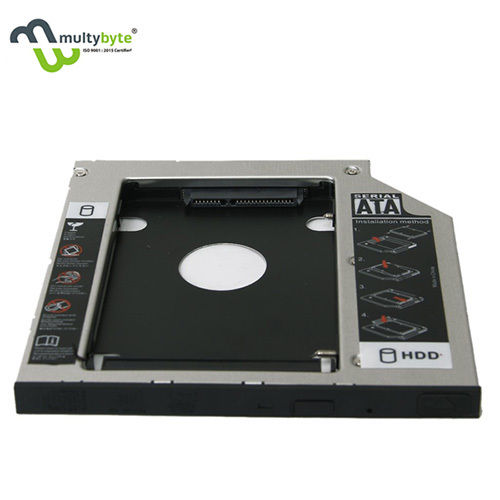
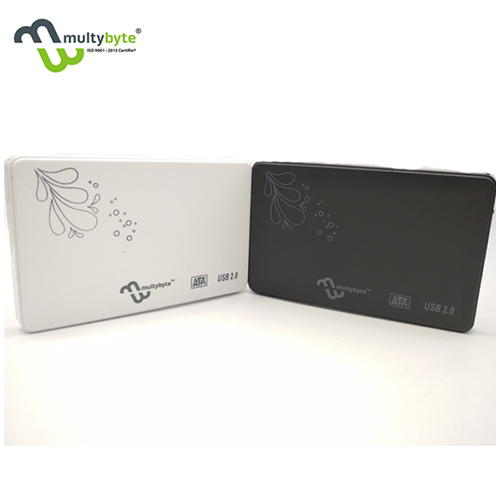
Dvd Rw Laptop 9.5 Caddy Computer Casing

डीवीडी आरडब्ल्यू लैपटॉप 9.5 कैडी कंप्यूटर केसिंग

उत्पाद विवरण:

  • तापमान 0°C to 60°C
  • मोटाई 9.5mm
  • तकनीक CNC Machining
  • साइज विभिन्न आकार
  • सतह का उपचार Anodized
  • माउंटिंग टाइप Internal, Slide-In
  • प्रोसेस Die Casting & Injection Molding
  • अधिक देखने के लिए क्लिक करें
X

डीवीडी आरडब्ल्यू लैपटॉप 9.5 कैडी कंप्यूटर केसिंग मूल्य और मात्रा

  • यूनिट/यूनिट
  • 100
  • यूनिट/यूनिट

डीवीडी आरडब्ल्यू लैपटॉप 9.5 कैडी कंप्यूटर केसिंग उत्पाद की विशेषताएं

  • Slide into laptop optical drive bay; secure with provided screws
  • डीवीडी आरडब्ल्यू लैपटॉप 9.5 कैडी कंप्यूटर आवरण
  • 129mm x 128mm x 9.5mm
  • Up to 90% RH (Non-condensing)
  • SATA HDD/SSD to Optical Bay Adapter
  • Matte
  • 90g Approx.
  • ±0.1mm
  • औद्योगिक
  • Precision Molding
  • 0°C to 60°C
  • विभिन्न आकार
  • Anodized
  • 9.5mm
  • CNC Machining
  • Die Casting & Injection Molding
  • औद्योगिक
  • Up to 2 Years
  • काला
  • Internal, Slide-In
  • Compatible with most 9.5mm SATA interfaces
  • Aluminum Alloy + ABS Plastic

डीवीडी आरडब्ल्यू लैपटॉप 9.5 कैडी कंप्यूटर केसिंग व्यापार सूचना

  • कैश इन एडवांस (CID)
  • 5000 प्रति महीने
  • 7-10 दिन
  • ऑल इंडिया

उत्पाद वर्णन

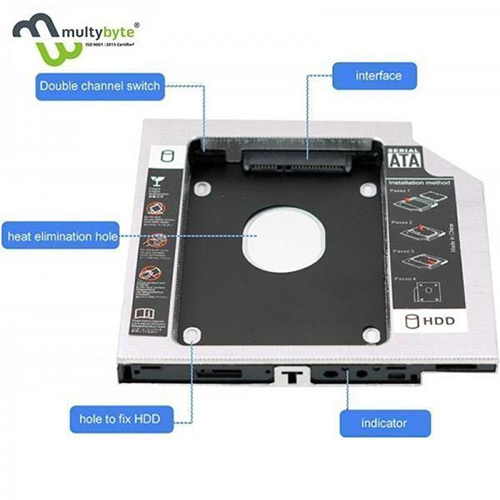
Add this caddy to your laptop to give you another hard drive. Simply remove your CD/DVD-ROM drive and put the Caddy (with the added hard drive) in its place. This is a good working Adaptor. Note: Please check the below cool item, that will turn your 9.5mm SATA connection drive into an external DVD drive, better yet, no AC Adaptor needed; External case for 9.5mm SATA DVD drive. Only a case, not included any drive) Support Plug & Play; Fast & Reliable connection just as the primary HDD. Fully integrated into Laptop, no cables/PSU/software driver needed. Dual boot, Support installation of 2nd Operating System on the 2nd HDD and boot selection.


Easy Laptop Storage Upgrade

Effortlessly boost your laptop's storage by replacing the optical drive with a 2.5-inch SATA HDD or SSD using this universal 9.5mm caddy. Its slide-in, screw-secured installation is beginner-friendly, using precise CNC machining for a snug fit. All tools and accessories are provided, letting you complete the process with ease.


Reliable Construction and Compatibility

The caddy features a solid aluminum alloy and ABS plastic frame with a matte, anodized finish. Engineered via die casting and injection molding, it is designed to fit most laptops with a standard 9.5mm SATA optical drive bay and provides basic mechanical and shockproof protection for your drives.


Universal Application for Enhanced Productivity

Ideal for both industrial and personal use, this SATA-to-Optical Bay adapter works with Windows, Linux, and MacOS systems (hardware dependent). Its precision build ensures compatibility and durability, making it a reliable choice for expanding mobile storage while maintaining the laptop's sleek form factor.

FAQ's of Dvd Rw Laptop 9.5 Caddy Computer Casing:


Q: How do I install the 9.5mm SATA HDD/SSD caddy in my laptop?

A: To install, simply slide the caddy into your laptop's optical drive bay and secure it with the provided screws. Attach the faceplate if necessary and connect your 2.5-inch SATA HDD or SSD. The process takes just a few minutes with the included screwdriver and manual.

Q: What types of drives are compatible with this laptop caddy?

A: This caddy supports 2.5-inch SATA HDDs and SSDs, utilizing the SATA III interface for data transfer rates up to 6Gb/s. It's compatible with most 9.5mm optical bay laptop configurations.

Q: When should I consider using a laptop caddy?

A: Use a laptop caddy when you need to expand storage, upgrade to an SSD, or repurpose your laptop's optical drive bay for faster and larger capacity drives. It's especially beneficial when your laptop lacks extra drive slots.

Q: Where can I use this caddy, and is it suitable for industrial environments?

A: This caddy is designed for both industrial and personal applications. Its durable aluminum alloy and ABS construction, with basic shockproof features, make it suitable for demanding environments, including high humidity up to 90% RH and temperatures from 0C to 60C.

Q: What is the installation process and what accessories are included?

A: The package contains screws, a screwdriver, a faceplate bezel, and a user manual. The process is straightforward: insert the HDD/SSD into the caddy, slide it into the optical bay, and fasten it securely. No special skills are required.

Q: How does using a laptop caddy benefit my laptop's performance and functionality?

A: Installing a caddy enables you to add extra high-speed storage or leverage SSD performance, enhancing data access, transfer speeds, and overall productivity without sacrificing your laptop's portability.

Q: Is the caddy compatible with all operating systems and does it require configuration?

A: The caddy supports Windows, Linux, and MacOS systems, depending on your laptop hardware. It's generally plug-and-play, requiring no additional configuration for most users.

Tell us about your requirement
product

Price:  

Quantity
Select Unit

  • 50
  • 100
  • 200
  • 250
  • 500
  • 1000+
Additional detail
मोबाइल number

Email

कंप्यूटर आवरण अन्य उत्पाद


Back to top