


 08045804700
 Send Inquiry
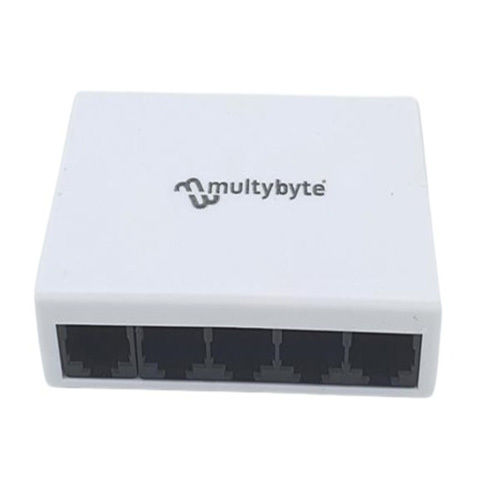
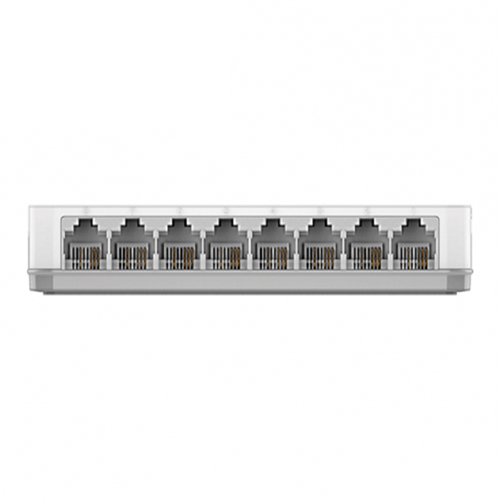
5-Port 10-100 Mbps Fast Ethernet Switch
242 INR/Unit
Product Details:
- Features Plug and Play, Auto MDI/MDIX, IEEE 802.3, 802.3u, 802.3x, Compact design
- Weight As per available
- Power Consumption As per available Volt (V)
- Frequency 50/60 Hz
- Interface Type RJ-45 10/100 Mbps
- Device Type Fast Ethernet Switch
- Network Device Switch
- Click to View more
X
5-Port 10-100 Mbps Fast Ethernet Switch Price And Quantity
- 100 Unit
- 242 INR/Unit
5-Port 10-100 Mbps Fast Ethernet Switch Product Specifications
- Switch
- Fast Ethernet Switch
- RJ-45 10/100 Mbps
- Wired
- Up to 100 meters (CAT5/5e UTP/STP)
- 0°C ~ 40°C
- As per available Millimeter (mm)
- As per available
- Plug and Play, Auto MDI/MDIX, IEEE 802.3, 802.3u, 802.3x, Compact design
- 50/60 Hz
- As per available Volt (V)
- Small Office, Home Network, SOHO, LAN Expansion
- 5 x 10/100 Mbps RJ-45 Ports (Auto Negotiation, Auto MDI/MDIX)
- 5 Ports
- -40°C ~ 70°C
- 1 Gbps (Non-blocking)
- 10% ~ 90% RH, non-condensing
- Desktop / Wall-mount
- 5% ~ 90% RH, non-condensing
- Plastic Housing
- 768 Kbits
- 5V/0.6A DC
- Power, Link/Activity
- up to 0.74 Mpps
- 1K Entries
5-Port 10-100 Mbps Fast Ethernet Switch Trade Information
- Cash in Advance (CID)
- 5000 Unit Per Month
- 7-10 Days
- All India
Product Description
|
Color |
White |
|
Product Name |
5-Port 10-100 Mbps Fast Ethernet Switch |
|
Condition |
New |
|
Quality |
High |
|
Store In |
Dry place |
>The 5-Port 10/100 Switch allows you to quickly set up a fast, reliable, and efficient wired network in your home or office. The Switch is an unmanaged 10/100Mbps switch designed to enhance small workgroup performance while providing a high level of flexibility. Powerful yet easy to use, this device allows users to simply plug any port to either a 10Mbps or 100Mbps network to multiply bandwidths, boost response time and satisfy heavy load demands.
Reliable Connectivity for Expanding Networks
Perfect for expanding wired networks in home, office, and SOHO environments, this Fast Ethernet Switch ensures stable connections for multiple devices. Whether used on a desk or mounted on a wall, its compact design fits into various setups. The device supports up to five concurrent connections, making it ideal for networking computers, printers, or smart devices efficiently and cost-effectively.
Effortless Setup and Usage
With a plug-and-play design, the switch requires no software configuration, enabling instant network expansion. Auto-negotiation and Auto MDI/MDIX features eliminate the need to worry about cable types, providing seamless integration for both beginners and experienced users. Simply connect your devices and power up the switch for immediate operation.
FAQ's of 5-Port 10-100 Mbps Fast Ethernet Switch:
Q: How do I install the 5-Port Fast Ethernet Switch in my network?
A: Installing the switch is straightforward: simply connect it to your router or modem using a compatible Ethernet cable, then plug additional devices such as PCs or printers into the remaining ports. The device supports both desktop and wall-mount options, allowing flexible placement according to your space requirements.Q: What types of devices are compatible with this Ethernet switch?
A: The switch is equipped with standard RJ-45 10/100 Mbps ports, making it compatible with various network devices, including computers, printers, IP cameras, and other Ethernet-enabled equipment. It supports up to five devices simultaneously, making it ideal for small office or home use.Q: When should I use this switch instead of a wireless connection?
A: You should use this Ethernet switch when you require higher network stability, lower latency, or secure wired connections. It is particularly beneficial for stationary devices like desktop computers, network printers, or media servers that can be connected via Ethernet cables for reliable, uninterrupted data transfer.Q: Where can the switch be placed for optimal performance?
A: The switch can be (and is designed to be) placed on a desktop or securely mounted on a wall. Ensure it is positioned in a well-ventilated area within your network's cabling range, and avoid placing it where it may be exposed to high temperatures or moisture-staying within its 0C ~ 40C operating temperature and 10% ~ 90% RH operating humidity range.Q: What is the plug-and-play process for this Ethernet switch?
A: Thanks to its plug-and-play functionality, you only need to connect your Ethernet cables from your modem/router and other devices to the switch. No configuration or driver installation is necessary. Power the switch using the included 5V/0.6A DC adapter, and it will automatically manage network traffic.Q: How does the switch benefit small offices or home networks?
A: This switch expands your wired network capacity quickly and securely, enabling up to five devices to communicate efficiently without slowing down your connection. It is cost-effective, maintenance-free, and helps prevent network congestion by automatically optimizing data flow.Tell us about your requirement

Price:
Quantity
Select Unit
- 50
- 100
- 200
- 250
- 500
- 1000+
Additional detail
Mobile number
Email

Other Products in 'Ethernet Switch' category

We accept only bulk quantity orders.
Contact Details
Multybyte Marketing India Co.
GST : 07AGVPB6587G2ZU
GST : 07AGVPB6587G2ZU

- B-16/6, Lower Ground Floor, Jhilmil Industrial Area,Delhi - 110095, India
- Phone : 08045804700

- Mr Jeevan Bothra (Director)
- Mobile : 08045804700
- info@multybyte.com
We Accept





 Send Inquiry
 Send SMS
Multybyte Marketing India Co.
All Rights Reserved.(Terms of Use)
Developed and Managed by Infocom Network Private Limited.
Developed and Managed by Infocom Network Private Limited.

