


 08045804700
 Send Inquiry
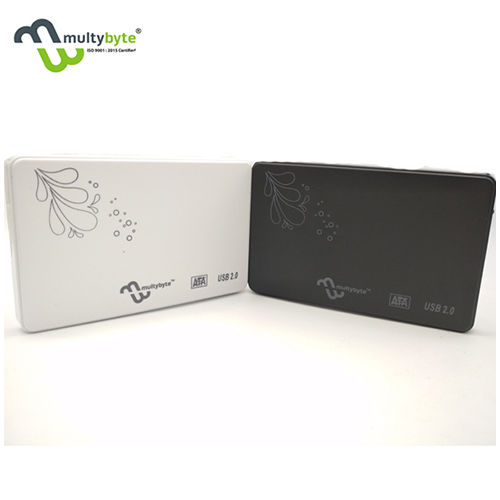
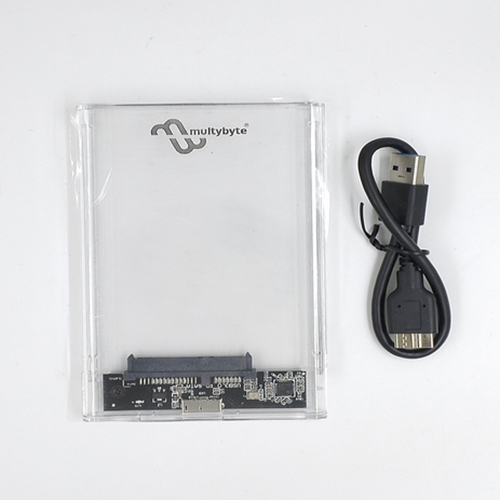
2.5 Sata Usb 2.0 Hdd Computer Casing
115 INR/Unit
Product Details:
- Surface Treatment Anodized and Painted
- Application Industrial
- Mounting Type External/Portable
- Tolerance ±0.2mm
- Material Aluminum Alloy + ABS Plastic
- Size Different Size
- Service Period 1 Year Warranty
- Click to View more
X
2.5 Sata Usb 2.0 Hdd Computer Casing Price And Quantity
- 115 INR/Unit
- 100 Unit
2.5 Sata Usb 2.0 Hdd Computer Casing Product Specifications
- Operating: 0°C~70°C
- 5%~90% (non-condensing)
- Not Rated
- DC 5V (via USB)
- 2.5 Sata Usb 2.0 Hdd Computer Casing
- Black
- DC 5V (via USB)
- Compliant with USB 2.0/1.1
- DC 5V (USB-Powered)
- Approx. 60 grams
- Tool-free installation, simply slide open and insert HDD/SSD
- Injection Molded & Precision Machined
- Slim & Portable
- Anodized and Painted
- Industrial
- External/Portable
- ±0.2mm
- Aluminum Alloy + ABS Plastic
- Different Size
- 1 Year Warranty
- High precision assembly
- 13mm
- Approx. 125mm x 78mm x 13mm
- Hot Swappable, Plug and Play
- Matte & Textured Finish
- Industrial
- Yes, basic shock protection design
- External Hard Drive Enclosure
- USB 2.0, backward compatible with USB 1.1
- 2.5 inch SATA HDD/SSD
- Up to 2TB (tested with 2TB drives)
- Windows XP/Vista/7/8/10, Mac OS, Linux
- USB 2.0 Data Cable (approx. 30cm)
- Power and Activity LED
- Ventilation slots for heat dissipation
- Up to 480Mbps (USB 2.0)
2.5 Sata Usb 2.0 Hdd Computer Casing Trade Information
- Cash in Advance (CID)
- 5000 Unit Per Month
- 7-10 Days
- All India
Product Description
>bumps and other harms. This External Hard Drive Casing also allows you to use a singular SATA 2.5-inch external hard drive for your home and office PCs by enhancing its flexibility and portability.Slim & Durable Design for All Environments
Engineered with aluminum alloy and ABS plastic, this enclosure offers both strength and lightweight portability. The slim, precision-machined body features ventilation slots, ensuring effective cooling even during intensive use. The enclosure's matte and textured finish provides a professional appearance suitable for both industrial and personal setups.
Effortless Tool-Free Installation and Compatibility
Thanks to its tool-free design, inserting a 2.5-inch SATA HDD or SSD is easy-just slide open the case and place your drive inside. The enclosure supports most major operating systems, including multiple versions of Windows, Mac OS, and Linux, making it a versatile storage solution for various devices.
Fast Transfers and Built-In Data Protection
With USB 2.0 interface, this enclosure delivers transfer speeds of up to 480Mbps, ensuring swift file movement. The built-in LED indicators provide real-time feedback on power and activity. Basic shock protection safeguards your valuable data, while plug-and-play functionality allows for hot swapping without rebooting your system.
FAQ's of 2.5 Sata Usb 2.0 Hdd Computer Casing:
Q: How do I install a 2.5-inch SATA HDD or SSD into this casing?
A: Installation is tool-free and straightforward. Simply slide open the enclosure, insert your 2.5-inch SATA HDD or SSD, close the case, and connect it to your computer using the included USB 2.0 data cable.Q: What is the maximum storage capacity supported by this HDD enclosure?
A: The enclosure supports up to 2TB, tested with 2TB drives, making it suitable for large data storage and frequent backups.Q: When should I use this external HDD casing?
A: This enclosure is ideal whenever you need to transform an internal 2.5-inch SATA HDD or SSD into a portable external drive-perfect for data transfers, backups, and expanding your storage for laptops, desktops, or industrial equipment.Q: Where can I use this HDD enclosure?
A: It can be used anywhere-at home, in the office, or during industrial operations. Its slim and portable design makes it easy to carry and connect to any compatible desktop or laptop with a USB port.Q: What operating systems are supported by this HDD enclosure?
A: The casing is compatible with Windows XP, Vista, 7, 8, and 10, as well as Mac OS and Linux, ensuring broad usability across devices.Q: What benefits does the ventilation and shock protection offer?
A: Ventilation slots help keep your drive cool during heavy use, enhancing reliability. Basic shock-resistant design protects your storage device from minor bumps, improving data safety during transport.Tell us about your requirement

Price:
Quantity
Select Unit
- 50
- 100
- 200
- 250
- 500
- 1000+
Additional detail
Mobile number
Email

Other Products in 'Computer Casing' category

We accept only bulk quantity orders.
Contact Details
Multybyte Marketing India Co.
GST : 07AGVPB6587G2ZU
GST : 07AGVPB6587G2ZU

- B-16/6, Lower Ground Floor, Jhilmil Industrial Area,Delhi - 110095, India
- Phone : 08045804700

- Mr Jeevan Bothra (Director)
- Mobile : 08045804700
- info@multybyte.com
We Accept





 Send Inquiry
 Send SMS
 Call Me Free
Multybyte Marketing India Co.
All Rights Reserved.(Terms of Use)
Developed and Managed by Infocom Network Private Limited.
Developed and Managed by Infocom Network Private Limited.

